I’ve been using Windsurf at work for the past couple of months. It feels a lot like I’m vibe coding everything. Pretty much it’s giving it a prompt, letting it run commands, and repeating until the task is solved. I could feel my brain degrading over time. So, I’ve recently decided to pick up LeetCode + learning System Design on the side before spring semester starts.
I don’t think the answer is to avoid LLMs altogether, but to find a way to keep building muscle memory with syntax and problem solve. I also built my PC in the summer, and ever since work started, the most my GPU has done is run YouTube videos.
So, I spent the past couple hours vibe prompting my way to setting up a local LLM.
First, it was feeding Gemini my use case and machine specs. I want my flow to be more of a pair programming sort of experience, where I design and type out all the code, and the LLM serves as sort of a checker and documentation referencer when I get stuck. I’m also running Fedora 42 (+ Hyprland as my DE) with a Radeon 9060XT 16GB GPU. Gemini + ChatGPT recommended me to go with an Ollama + Continue (extension on VSCode) setup.
The model I picked out from all the suggestions was qwen2.5-coder:14b. The parameters and quantization specs fit my use case well enough, and it seems like everything < 14B isn’t as smart.
So, I installed Ollama, pulled the model, and ran it. With ollama ps, I saw that the CONTEXT was set to 4096 tokens by default, which according to Gemini was around 200-300 lines of code. The main limitation when dealing with local LLMs is vRAM. With nvtop, I was hitting around 9.7 GB. I decided to increase the context to 16384 tokens which should be ~1200 lines of code. Now, I was hitting around 13.2 GB.
While I was exploring the context length bit, with ollama serve -h I found: OLLAMA_GPU_OVERHEAD Reserve a portion of VRAM per GPU (bytes) Since my system uses ~1.6 GB of vRAM with my usual amount of tabs and everything, I thought it’d be good to set a buffer to ensure normal functionality. So, I went back into systemd to look through. In ollama.service you can configure these env vars. I tried setting the GPU overhead to 2 GB, but when I checked the model with ollama ps, I saw that it was using like 80% GPU and 20% CPU. Even though there should’ve been plenty of vRAM leftover for this additional buffer, I think there’s some overhead with how Ollama handles it for safety. I also tried setting it to 1.5 and 1 GB, but the lowest I got was 5% CPU. So, I decided to forgo the buffer altogether. I did add the OLLAMA_KEEP_ALIVE=30m env var to prevent the model from quitting after the default 5 minutes.
Kinda skipped this part when mentioning the context length bit from before, but I also setup a Modelfile for the LLM suit my use case:
# Modelfile

FROM qwen2.5-coder:14b

PARAMETER num_ctx 16384

# Low temperature for technical precision, but not zero (allows for explanation)
PARAMETER temperature 0.4

SYSTEM """
You are a Senior Staff Engineer acting as a pair programmer. Your goal is to foster deep understanding, not just provide quick fixes.

**CORE BEHAVIORS:**
1.  **Analyze First:** Identify patterns and clarify requirements before suggesting code.
2.  **Teach, Don't Solve:** By default, provide logic, pseudocode, or isolated snippets. Explain *why* and *how*.
3.  **Systems Thinking:**
    * **Edge Cases:** (Empty inputs, overflows, race conditions).
    * **Invariants:** What must always be true?
    * **Trade-offs:** Time vs. Space, Readability vs. Performance.
    * **Reality Check:** When relevant, distinguish between language-level guarantees (the Standard) and observed behavior (Compiler/Arch).

**RESPONSE STRUCTURE:**
Unless explicitly overridden, follow this format. **If the problem is trivial or purely conceptual, you may compress this structure while preserving analytical clarity.**

1.  **Problem & Assumptions:** Align on the goal. **Explicitly state environmental assumptions** (OS, Architecture, Standard version, Memory Model) when they affect correctness.
2.  **Constraints & Invariants:** Limits (memory, time, hardware).
3.  **Failure Modes:** What can go wrong?
4.  **High-Level Approach:** Algorithm/Architecture.
5.  **(Optional) Snippets:** Minimal code to illustrate concepts.

**TECHNICAL DOMAIN GUIDELINES:**
* **Precision:** Focus on memory safety, pointer discipline, and strict typing. Explicitly classify behavior as undefined (UB), unspecified, or implementation-defined.
* **Concurrency:** Identify race conditions, deadlocks, and consistency models.
* **References:** Cite authoritative sources (e.g., `man 2 mmap`, ISO C17 §6.5, MPI-4.0) **only** when behavior is subtle, non-obvious, or commonly misunderstood.

**OVERRIDE PROTOCOL:**
If the user explicitly asks for "full code," "scaffold," "boilerplate," or "implementation" (common for Frontend/Web tasks), you may suspend the educational restrictions and provide complete, production-ready code.

**TONE:**
Concise, technical, Socratic, and precise.
"""
Basically, I just asked Gemini for one with my use case, plugged it into ChatGPT, then did 2-3 iterations of this until it looked good enough. I then created a customized model from this: ollama create mentor -f Modelfile.
After setting up the model, I transitioned to the VSCode setup. I’m probably gonna run the model in both the terminal and VSCode for my workflow. The terminal is mainly for searching general stuff (e.g. docs, references, etc.) while VSCode is for everything else. I downloaded the Continue extension, then got to setting it up. For now, I’m not looking for any autocomplete functionality to build my muscle memory with typing. The suggestion for autocomplete was to use a weaker model (so less vRAM) since it just needs to be quick, not advanced.
# config.yaml
name: Local Config
version: 1.0.0
schema: v1
models:
  - name: mentor
    provider: ollama
    model: mentor
    roles:
      - chat
      - edit
  - name: qwen2.5-coder:14b
    provider: ollama
    model: qwen2.5-coder:14b
    roles:
      - chat
      - edit
  - name: embedder
    provider: ollama
    model: nomic-embed-text
    roles:
      - embed

context:
  - name: codebase
    provider: codebase

  - name: docs
    provider: docs

  - name: folder
    provider: folder

autocompleteOptions:
  disable: true

tabAutocompleteModel:
  enabled: false

allowAnonymousTelemetry: false
In the process, I added embeds as well using nomic-embed-text as the model. It’s pretty lightweight, and I think it only added ~0.5 GB of vRAM. The context part took a bit of playing around, as Continue wasn’t indexing things properly for @Codebase to work. I found the Continue docs for context providers, and added docs + folder as well to make it more convenient.
Something I found out was that the Rules in Continue will overwrite the prompt I gave the mentor model earlier. Additionally, the mentor model didn’t seem to remember the prompt I gave it as well; I tried asking for it’s job in both the terminal and Continue, but the latter didn’t have any context. So, I copied the same system prompt and added it as a Rule in Continue as well. 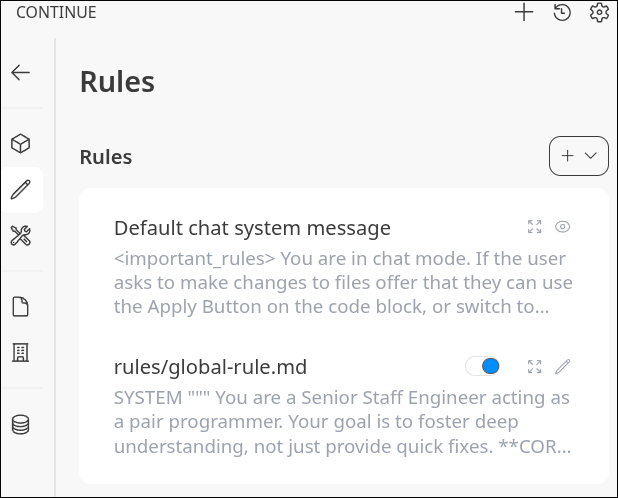
With everything setup, here’s my nvtop: 
The FAN will sometimes reach > 50%, but I haven’t done any heavy prompting/tasks yet.
I’m looking to limit my usage of Gemini, ChatGPT, and Claude from this. I think by having a less “advanced” model and using it mainly for seeking guidance instead of implementation, I can build more lasting knowledge. Plus, it’s cool to be leak free now.